LED indicators
► 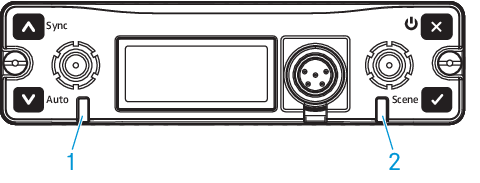
1 LED CH1
• Status LED for receiving channel CH1
2 LED CH2
• Status LED for receiving channel CH2
Meaning of the LEDs
Off
• The receiving channel is deactivated, e.g. to safe battery life. „Inactive“ appears on the display panel. for how to activate/deactivate a receiving channel refer to „Using the operating menu“
Green
• The receiving channel is activated and receives a transmitter. The accupacks of the transmitter and the receiver are sufficiently charged
Yellow
• A status message is shown on the display panel.
Red
• The receiving channel does not receive a transmitter.