Top
► 
►
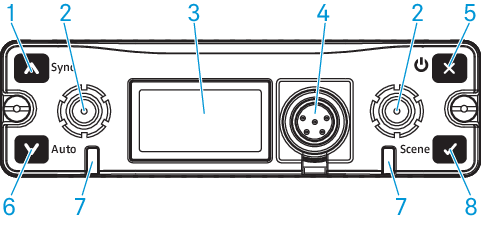
1 Button Sync
• Short-press:
• Switches between the standard display and the CH1 or the CH“ display
• Returns you to the previous menu item
• Increases the set value
• long-press:
• Synchronizes a transmitter with the EK 6042
2 SMA-sockets
• for the detachable antennas (diversity section A and B)
3 Display panel
• see „Display panel“
4 5-pin mini XLR socket (Top) AUX 1/2
• Audio socket of the secondary audio outputs AUX 1 and AUX 2 (underneath a cover)
• can only output analog audio signals
• outputs the same audio signal as the audio socket AUX 1/2
5 Button On/Off
• Short-press:
• Navigates to the next higher level in the menu
• Exits the menu item without storing the changes to the settings
• Long-press:
• Switching on
• Switching off
6 Button Auto
• Short-press:
• Switches between the standard display and the CH1 or the CH“ display
• Returns you to the previous menu item
• Reduces the set value
• Long-press: (Auto)
• Starts the automatic configuration
7 LEDs CH1 und CH2
8 Button Scene
• Short-press:
• Changes from the current standard display, the CH1 display or the CH2 display to the operating menu
• Calls up the selected menu item
• Confirms the selection
• long-press:
• Calls up a stored scene
• see „Changing scenes“